
FEDTERM MANUAL - GETTING STARTED
SETTING UP THE SOFTWARE
Downloading FedTerm
You can download FedTerm from our web site at http://www.ibgames.net/fed2/fedterm/index.html. The file is called FedTermSetUp.exe.
Installing the Program
When you run the program you downloaded, the installation will start. You will be asked what directory you want the FedTerm program to go in: it defaults to C:\ibgames\FedTerm but you can change it to something else if you want.
The download contains the following files:
- The program file, FedTerm.exe
- Some library files
- Graphics files used to draw the maps, in the Images sub-folder
- A map file showing part of Earth, earth.xml, in the maps sub-folder
- Some character portrait graphics, in the pictures sub-folder
- Some pictures of planets, in the planets sub-folder
- Commodity pictures in the exchanges sub-folder
- Some sound files which will play when certain things happen in the game, in the sounds sub-folder
When you install the program it will put an icon on your desktop.
Running the Program
Run FedTerm by double-clicking on the icon on your desktop, or clicking the Start button and finding FedTerm in the program list.
The first time you run FedTerm, Windows may put up a warning box, something like this:
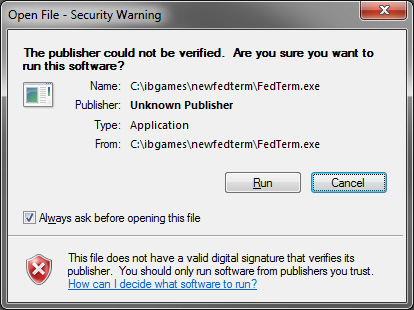
Click ‘Run’ to run the program. Some versions of Windows will give you the option to stop asking for this confirmation – untick the box in the warning window. However, even if you do this, the warning box will reappear should you upgrade to a new version of FedTerm.
You must have be connected to the internet in order to play Fed2.
