
FEDTERM MANUAL - PLAYING FEDERATION 2 WITH FEDTERM

THE STATS DISPLAY

A panel on the left of the main screen shows some of the details from your 'SCORE' and 'STATUS' display. FedTerm keeps them updated every time something changes. When you are on the ground, the display shows your character details, including your four stats, your bank balance, your loan (if you still have one) and whatever points are relevant to your rank (hauling credits, trader credits, etc).

A bar at the bottom of the panel gives a visual indication of your stamina. When your stamina drops to two-thirds of its maximum value, the bar turns yellow; at one-third it changes to red. You can make this bar display any of the four stats - just click on the stat you want it to show.

This panel also displays your picture, if one is available. Pictures are explained later in this manual.

When you get into your ship, the display will switch to showing your ship details: fuel, hull, engines, computer and cargo space. The bar shows your fuel level and turns yellow, then red, as the level drops. You can click on one of the other ship stats if you want the bar to show a different stat.
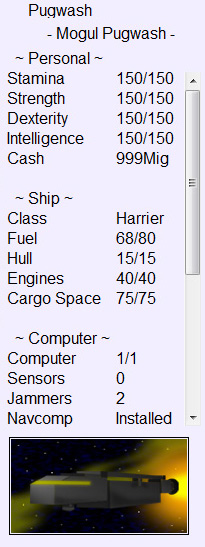
Note that if you buy a new ship, the ship stats won't update right away - you will need to log off and back on again.

The picture shown is a representation of your ship, with a different picture for each class of ship. Underneath the picture there is a row of twinkly lights. You can switch them off with the 'Console Lights' item in the 'Options' menu.

You can toggle between these two displays by clicking on the tabs at the bottom of the panel. You can switch the whole stats panel off with the 'Stats Panel' item from the 'Options' menu.


Next page in Playing Fed section
Previous page in Playing Fed section

Playing Fed index


The FedTerm manual - online index

Download the FedTerm manual


Back to the FedTerm page
Fed2 manuals and maps
Fed2 home page