
FEDTERM MANUAL - CHANGING FEDTERM'S LOOK
USING CHARACTER PICTURES
FedTerm will display a picture of your Fed2 character on the stats panel, if you have one, otherwise it will show the default interference picture. It will also display pictures of other players when you examine a player, or when you ask for a SpyNet Report.
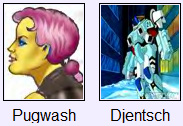
The front-end comes with some pictures included in the installation, including portraits of Bella, Hazed, Freya, Buddy, Catspaws, Arlene and Fancy. You will need to provide your own character picture which you can then swap with other players.
You can make your own picture, either by drawing a representation of your character (or getting somebody else to do it for you) or by cropping and resizing a photo of yourself. The picture must be in .png format and it should be given a filename that matches your Fed2 character name (for example, hazed.png or newbod.png). The picture size is 80 x 96 (that's 80 pixels wide by 96 pixels high). That's fairly small so you may find a head-and-shoulders picture works better than a full body picture. You need to put the picture file in the pictures sub-folder of your FedTerm folder.
We provide some standard pictures on the web site which you can use for your character - see the details at http://www.ibgames.net/fed2/fedterm/pictures.html.
Once you have a picture in the correct format, with the filename that matches your character name, you can give it to your friends so it shows up in their FedTerm when they have private chats with you. You can also send it to us (feedback@ibgames.com) and we will add it to the player gallery at http://www.ibgames.net/fed2/fedterm/gallery/index.html. You can download pictures for other players from the gallery.
You can also have a picture of your planet - see the information in the section on the systems page.
