
FEDTERM MANUAL - PLAYING FEDERATION 2 WITH FEDTERM
AUTO-MAPPING
As you walk around in Fed2 DataSpace, FedTerm will keep track of where you go and will draw a map. A small section of the map is shown on the top right of the main window. Use the scroll bars to see other areas of the map.
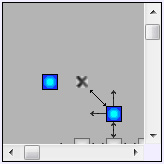
The status bar at the bottom of the screen will also tell you which location you are in, the planet/system, and who owns it.

If you hover the mouse over a location on the map, a tooltip will come up telling the location’s name. Note that it takes a few seconds for it to appear. On the mini-map, you have to click on the map first so that the map has the cursor focus.
To see a full-sized map click the Map tab. This switches the whole screen to the map page.
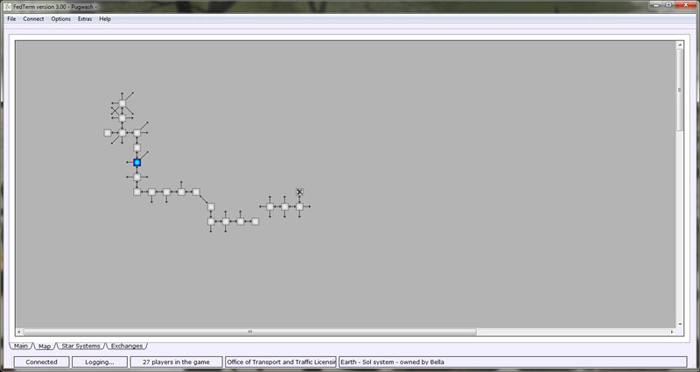
Both maps show you the location you are in with a cross; other locations you have visited are in grey. Locations you have not yet visited do not appear on the map. Lines show which direction of exits that lead out of the room, with arrows to show the direction of the link (sometimes links are one-way so you can move in one direction but not come back).
If a location has an up or down movement it shows in blue. On space maps, peace locations are green.
Note that the maps are only 2D so cannot show whether you can up, down, in or out - you will need to read the room description to see if any other exits are mentioned, and of course some exits in those four directions may be hidden from view.
There is also no guarantee that a line on the map, indicating a direction you can move in, will lead to a location which is next to the current location. You might be moved elsewhere on the map. You may also find the exit takes you to a place you don't want to be, so it pays to read the description first.
When you first use FedTerm, all of the maps will be blank except for a small part of Earth. To help new players, this map shows the locations that lead from the Meeting Point (where you start) to the permit office (the first place you need to find).
Each planet has its own map - and so does Sol space - so each time you board your ship, the map will change. FedTerm will remember which locations you have visited on each planet, so when you return to a planet the map will show your previous explorations.
If you move the mouse pointer over the map, the name of the location underneath the pointer will be displayed in the status bar at the bottom of the screen. This helps you to find a specific place on the map.
Next page in Playing Fed section
Previous page in Playing Fed section
